Windows Live Captions vs Hearica: Accuracy Benchmark
This is the full report behind our article Windows Live Captions alternative, tested on real meetings. We captioned the same 18 minutes of recorded meetings with both apps at the same time, on the same laptop, and did it twice. Below is what we did, every number, how we checked the results, and what they do and don’t show.
Downloads: report as PDF · all scores as JSON · scoring files to reproduce the numbers (ZIP)
Key findings
- Clear speech was a tie. On three clips with headset microphones and one speaker at a time, Windows Live Captions made 65 errors and Hearica 67, out of 1,315 words (4.9% and 5.1%).
- On difficult speech, Hearica made 30% fewer errors. On three clips recorded with one room microphone and overlapping speakers, Hearica made 647 errors and Windows 926, out of 1,970 words (32.8% and 47.0%).
- Windows’ errors were mostly missing words. On the difficult clips it never showed 838 of the 1,970 words (43%), against 452 (23%) for Hearica. Capturing that much more, Hearica got 1,337 words right against Windows’ 1,047, though it also misheard more along the way (181 wrong words against 85).
- Overall, Hearica made 28% fewer errors: 21.7% against 30.2%.
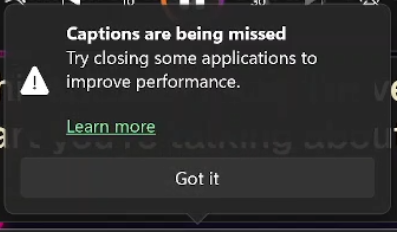
- Under heavier load, Windows fell behind; Hearica’s accuracy didn’t change. In a first run with more apps open, Windows drifted up to about 20 seconds behind the speech, warned that captions were being missed, skipped passages to catch up, and removed 121 words it had already shown. Its error rate rose to 40.5%. Hearica scored 21.7% in both runs.
What we tested
| Hearica | Windows Live Captions | |
|---|---|---|
| Version | 0.682.1 | Windows 11, version 25H2 (OS build 26200.9168) |
| Language | English, selected rather than auto-detected | English (United Kingdom) |
| Audio | Computer audio | Computer audio |
| Other settings | Speaker separation off, pause detection off, strict single-language filter on | Microphone audio off |
| Where recognition runs | In the cloud | On the laptop |
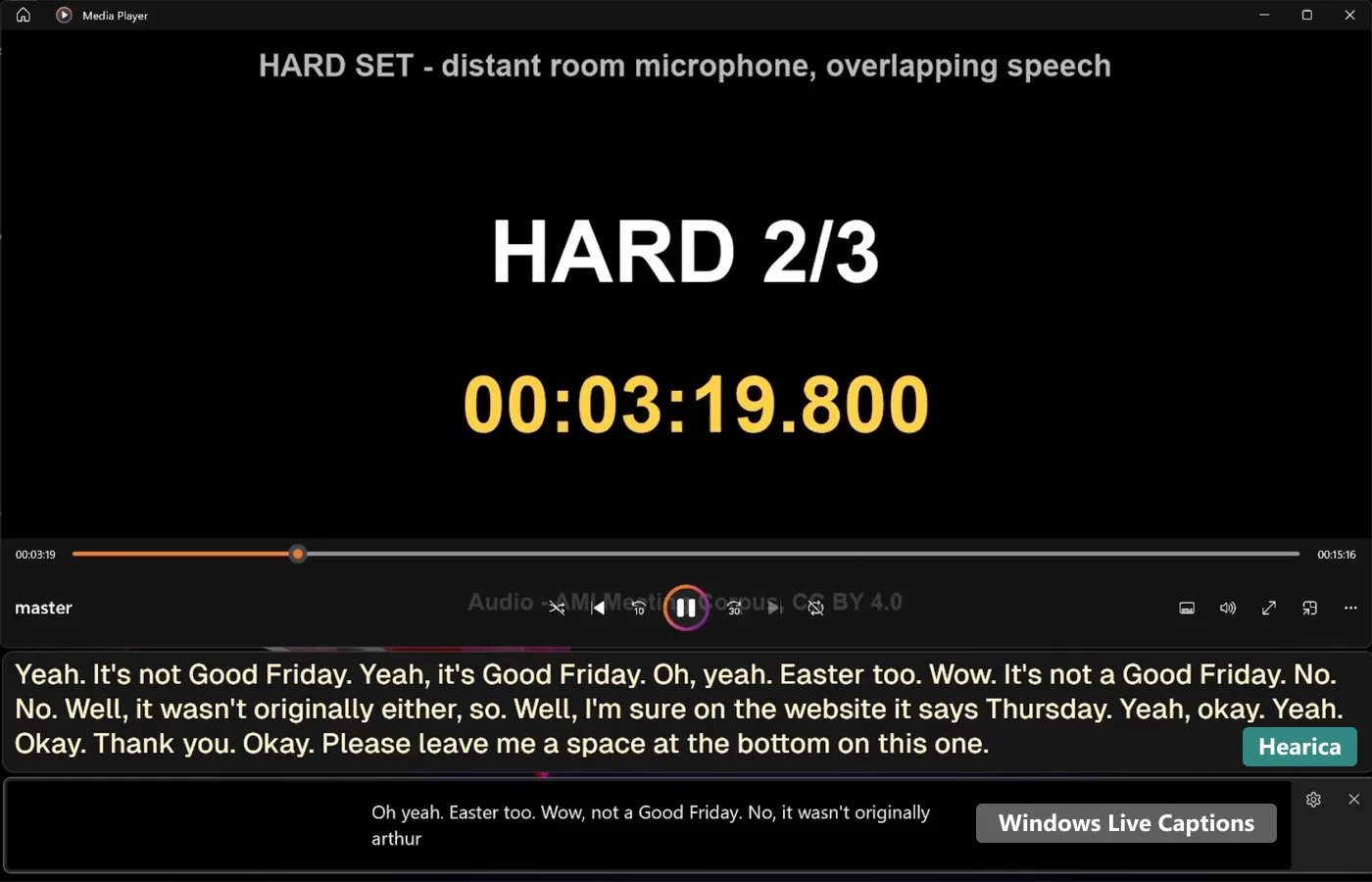
Both apps ran at the same time on a Microsoft Surface Book 2 (Intel Core i7-8650U at 1.90 GHz, 8 GB of memory), listening to the same playback in Windows’ Media Player app through the laptop’s default output. OBS Studio recorded the screen, with Hearica’s floating caption window above Windows’ caption window. Both runs took place on 7 October 2026.
| Run 1 | Run 2 | |
|---|---|---|
| Other apps | Several open | Closed to free memory |
| Screen recording | 1616 × 1080, 60 fps | 1616 × 1080, 30 fps |
| Test video started | 12.0 s into the recording | 9.6 s into the recording |
Run 2 is the main result, because it’s the fairer test of what each app can do. Run 1 shows what happened under heavier load. The runs changed two things at once (other apps and recording frame rate), so they don’t isolate a single cause.
The audio
All six clips come from the AMI Meeting Corpus (AMI Consortium, University of Edinburgh), a widely used set of recorded meetings with hand-made, word-timed transcripts. It’s licensed CC BY 4.0. Every clip is three minutes long and comes from AMI’s held-out evaluation meetings.
| Clip | AMI meeting and part used | Microphone | Words scored | Volume change |
|---|---|---|---|---|
| Hard 1 | EN2002d, 20:50–23:50 | One room microphone | 763 | +8.4 dB |
| Hard 2 | ES2004a, 5:50–8:50 | One room microphone | 413 | +14.6 dB |
| Hard 3 | IS1009b, 14:10–17:10 | One room microphone | 794 | +0.8 dB |
| Easy 1 | ES2004b, 14:10–17:10 | Mix of headset microphones | 532 | −3.4 dB |
| Easy 2 | IS1009d, 2:30–5:30 | Mix of headset microphones | 365 | −6.0 dB |
| Easy 3 | TS3003b, 4:30–7:30 | Mix of headset microphones | 418 | +18.2 dB |
- Hard clips are the three-minute windows with the most overlapping speech in their meeting groups, recorded on AMI’s single distant microphone (
Array1-01). Speakers interrupt, laugh and talk over one another. - Easy clips come from different meetings. They were chosen by a rule fixed before either app was tested: at least 80% speech and 350 words, with as little overlap and interruption as possible. In practice, each is mostly one person presenting.
- Volume: the clips’ recorded levels differed by up to 24 dB, so each was raised or lowered by one fixed amount to a similar loudness (−31 dBFS RMS, peaks at or below −1 dBFS). Nothing else was changed: no compression, filtering or noise reduction.
The six clips were joined into one 18 minute 35 second video, hard clips first, with five seconds of silence between clips. The video showed the clip name and a running timer, which made the recordings easy to line up afterwards.
How we scored
We used word error rate (WER): the number of words a system got wrong, left out or added, divided by the number of words in the human transcript. Lower is better.
- Hearica was scored from its own saved transcript.
- Windows Live Captions has no export, so its text was read from the screen recordings (next section).
- The same text rules applied to both: capitals and punctuation ignored, numbers compared as words (“75%” equals “seventy five percent”), British and American spellings treated as the same, and fillers such as “um” and “uh” removed from both sides, since caption apps usually drop them on purpose. Repeated words and the human transcript’s cut-off fragments were kept, which costs both apps a little. Scores with fillers kept are further down.
- Each app’s whole transcript was aligned once against the six human transcripts in order, and every error was counted against the clip it fell in, so no transcript had to be cut at clip boundaries.
- Group scores are total errors divided by total words. “30% fewer errors” means (Windows’ errors − Hearica’s errors) ÷ Windows’ errors.
How we read Windows’ captions
Windows Live Captions keeps no record of what it shows, so we reconstructed its text from the recordings and checked that reconstruction three ways.
- Main reading. Four times a second, the Windows caption box was cropped from the recording and read with Tesseract OCR. The rolling two-line captions were then stitched into one transcript, following Windows’ own rewrites of its unfinished lines, including when it rewrote spoken numbers as digits. Every uncertain join was checked by eye, and four misread words were corrected against the frames.
- Independent reconstruction. A second pipeline, built separately and completed before any comparison, decoded every frame of both recordings (68,039 and 33,949 frames). It agreed with the main reading on 99.9% of words. The two words that differed in each run were checked against the frames; afterwards both produced identical scores.
- Second reader. Gemini 2.5 Flash Lite re-read all 4,150 caption snapshots independently, shuffled across both recordings so it couldn’t use context to guess. It agreed on 99.2% and 99.3% of words. Every disagreement was checked against the frame, and each time the main reading matched what Windows displayed.
Text that Windows showed and then removed. Four times in run 1 (none in run 2), Windows removed words it had already displayed, 121 in all. The largest case was 55 correctly captioned words, visible for about 20 seconds before they vanished. The main scores use what Windows finally kept, as a reader of a transcript would see it. Counting the removed words as shown instead improves Windows’ run 1 score from 40.5% to 36.9%. Both are reported below.
Results: run 2 (main result)
| Hard clips | Easy clips | All six | |
|---|---|---|---|
| Hearica | 32.8% | 5.1% | 21.7% |
| Windows Live Captions | 47.0% | 4.9% | 30.2% |
| Clip | Words | Hearica errors | Hearica WER | Windows errors | Windows WER |
|---|---|---|---|---|---|
| Hard 1 | 763 | 284 | 37.2% | 404 | 52.9% |
| Hard 2 | 413 | 145 | 35.1% | 296 | 71.7% |
| Hard 3 | 794 | 218 | 27.5% | 226 | 28.5% |
| Easy 1 | 532 | 20 | 3.8% | 17 | 3.2% |
| Easy 2 | 365 | 20 | 5.5% | 18 | 4.9% |
| Easy 3 | 418 | 27 | 6.5% | 30 | 7.2% |
What kind of errors each app made:
| Wrong words | Missing words | Extra words | Total | |
|---|---|---|---|---|
| Hearica, hard clips | 181 | 452 | 14 | 647 |
| Windows, hard clips | 85 | 838 | 3 | 926 |
| Hearica, easy clips | 26 | 40 | 1 | 67 |
| Windows, easy clips | 25 | 38 | 2 | 65 |
Results: run 1 (heavier load)
| Hard clips | Easy clips | All six | |
|---|---|---|---|
| Hearica | 32.9% | 4.9% | 21.7% |
| Windows Live Captions | 59.1% | 12.7% | 40.5% |
| Windows, counting removed text as shown | 54.7% | 10.2% | 36.9% |
| Clip | Words | Hearica errors | Hearica WER | Windows errors | Windows WER |
|---|---|---|---|---|---|
| Hard 1 | 763 | 286 | 37.5% | 404 | 52.9% |
| Hard 2 | 413 | 145 | 35.1% | 322 | 78.0% |
| Hard 3 | 794 | 217 | 27.3% | 438 | 55.2% |
| Easy 1 | 532 | 19 | 3.6% | 122 | 22.9% |
| Easy 2 | 365 | 17 | 4.7% | 18 | 4.9% |
| Easy 3 | 418 | 29 | 6.9% | 27 | 6.5% |
How far behind Windows’ captions ran
How long after each word was spoken Windows first showed it, as the median for each 30 seconds of each clip. We matched the captioned words to the human transcript’s word timings.
| Clip | 0–30 s | 30–60 s | 60–90 s | 90–120 s | 120–150 s | 150–180 s |
|---|---|---|---|---|---|---|
| Run 1 | ||||||
| Hard 1 | 2.0 s | 5.2 s | 5.0 s | 11.8 s | 13.3 s | 17.3 s |
| Hard 2 | 12.0 s | 11.1 s | – | – | – | 2.1 s |
| Hard 3 | 3.8 s | 13.2 s | – | 3.1 s | 12.7 s | 16.1 s |
| Easy 1 | 3.8 s | 9.6 s | 13.8 s | 13.5 s | 20.8 s | 1.8 s |
| Easy 2 | 1.3 s | 1.7 s | 2.6 s | 2.1 s | 1.3 s | 1.5 s |
| Easy 3 | 2.4 s | 2.4 s | 3.2 s | 2.0 s | 2.2 s | 2.1 s |
| Run 2 | ||||||
| Hard 1 | 0.9 s | 0.9 s | 0.9 s | 0.9 s | 0.8 s | 1.1 s |
| Hard 2 | 1.0 s | 1.0 s | 1.1 s | – | – | 1.0 s |
| Hard 3 | 0.9 s | 0.8 s | 0.8 s | 0.8 s | 0.9 s | 0.8 s |
| Easy 1 | 0.8 s | 0.8 s | 0.8 s | 0.7 s | 0.8 s | 0.9 s |
| Easy 2 | 0.9 s | 1.0 s | 0.9 s | 0.9 s | 0.8 s | 0.9 s |
| Easy 3 | 2.4 s | 0.9 s | 0.9 s | 0.7 s | 0.9 s | 0.8 s |
“–” means Windows showed almost nothing in that stretch.
In run 2, Windows stayed about a second behind throughout. In run 1, in the clips with the fastest speech (hard 1 and 3, about 4.5 words a second, and easy 1, about 3), it fell steadily behind, up to about 20 seconds, then jumped back to near real time, dropping the speech in between. For example, in easy clip 1 it skipped everything said between 11:39.6 and 11:59.9 on the video timer.
In run 1, Windows also showed its own warning, twice: from 4:28 to 6:27 on the video timer, and from 11:58 to 12:48, appearing just as it skipped ahead in easy clip 1. It never appeared in run 2.
On hard clip 2, Windows showed almost nothing for long stretches in both runs, even when it wasn’t behind.
We didn’t measure Hearica’s on-screen delay, so this report makes no comparison of the two apps’ speed. Hearica’s accuracy was the same in both runs.
Scores with fillers kept
| Hard clips | Easy clips | All six | |
|---|---|---|---|
| Hearica, run 2 | 35.3% | 8.8% | 24.6% |
| Windows, run 2 | 48.9% | 8.5% | 32.7% |
| Hearica, run 1 | 35.3% | 8.6% | 24.6% |
| Windows, run 1 | 60.6% | 15.9% | 42.7% |
| Windows, run 1, counting removed text as shown | 56.3% | 13.5% | 39.2% |
Keeping “um”, “uh” and similar words adds them to the human transcript. Both apps mostly leave them out, so both scores rise, and the comparison between the apps barely changes.
What these results do and don’t show
They show that on this audio Hearica and Windows Live Captions are level on clear, one-at-a-time speech; that Hearica makes substantially fewer errors on overlapping, distant-microphone meeting speech, mainly because Windows leaves much more out; and that Windows’ accuracy depends on how busy the computer is, while Hearica’s didn’t change.
They don’t show how the apps compare in other languages, with other accents or microphones, or on other computers. This is six English clips, one laptop and one run per condition. The hard clips were chosen for being difficult, so their error rates are higher than typical meetings. The test doesn’t measure translation, custom vocabulary, readability or Hearica’s speed. AMI recordings are public, so either system may have encountered them during development.
Data and reproducing the scores
- All scores as JSON: every clip’s wrong, missing and extra words for both runs and both filler settings, the volume changes, and fingerprints (SHA-256) of every audio file.
- Scoring files (ZIP): the scoring script, the human transcripts, and both apps’ transcripts from both runs. Running the script reproduces every number in this report.
Credits
Test audio and human transcripts: AMI Meeting Corpus, AMI Consortium / University of Edinburgh, licensed CC BY 4.0. Excerpts were cut, joined and adjusted in volume as described above.
Test design and recordings: Hearica, 7 October 2026. Report published 12 October 2026. Windows Live Captions facts are from Microsoft’s Live Captions guide.